Expression function reference
Expressions format or combine values inside supported Designer bindings. Start with a direct binding and add an expression only when the displayed result needs logic or formatting.
References usually begin with row, var, design, images, game, layer, or cell, depending on the field. Use the expression help button in the Designer to see the values available in the current context.
Common patterns
{{ upper(row.rarity) }}
{{ default(row.subtitle, "No subtitle") }}
{{ if(row.foil, "Foil", "Standard") }}
Keep an expression short, preview true/false and empty-value cases, and check the generated result in Export QA.
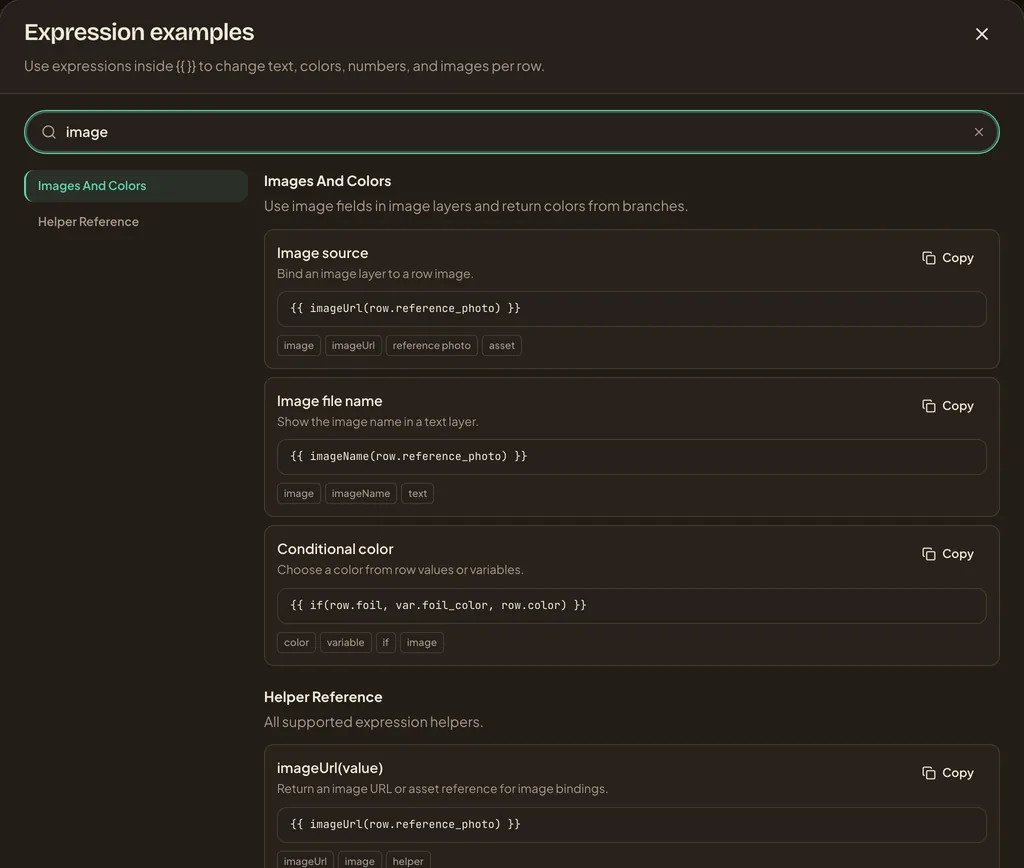
Open Expression examples from the Designer and search for an outcome such as image, number, or contains. The window lists examples; the binding field still decides which scopes and result types are valid. Copy a small example, replace its row or var keys, then test it against representative rows and Export QA.
Logic
| Function | What it does | Example | Other names |
|---|---|---|---|
if(condition, whenTrue, whenFalse) | Return one value when a condition is true, otherwise return another value. | {{ if(row.foil, "Foil", "Standard") }} | ternary |
default(value, fallback) | Use a fallback when a value is empty. | {{ default(row.subtitle, "No subtitle") }} | fallback |
oneOf(value, ...options) | Check whether a value is equal to any listed option. | {{ oneOf(row.rarity, "rare", "mythic") }} | inList |
Text
| Function | What it does | Example | Other names |
|---|---|---|---|
concat(value, ...values) | Join text, numbers, and variables into one value. | {{ concat(row.title, " - ", var.game_short_name) }} | joinText |
join(separator, ...values) | Join values with a separator. | {{ join(" / ", row.type, row.rarity) }} | — |
upper(value) | Convert text to uppercase. | {{ upper(row.rarity) }} | upperCase |
lower(value) | Convert text to lowercase. | {{ lower(row.rarity) }} | lowerCase |
title(value) | Capitalise each word in a text value. | {{ title(row.element) }} | upperCaseEachWord |
capitalize(value) | Capitalise the first letter of a text value. | {{ capitalize(row.name) }} | upperCaseFirstLetter |
trim(value) | Remove whitespace from the start and end of text. | {{ trim(row.title) }} | — |
length(value) | Count the characters in text or items in a list. | {{ length(row.title) }} | — |
contains(value, search) | Check whether text contains another value. | {{ contains(lower(row.tags), "fire") }} | inText |
startsWith(value, start) | Check whether text begins with a value. | {{ startsWith(row.title, "A") }} | — |
endsWith(value, end) | Check whether text ends with a value. | {{ endsWith(row.code, "-foil") }} | — |
replace(value, search, replacement) | Replace matching text inside a value. | {{ replace(row.rarity, "rare", "mythic") }} | — |
repeat(value, count) | Repeat text a fixed number of times. | {{ repeat("*", row.stars) }} | — |
reverse(value) | Reverse the characters in text. | {{ reverse(row.code) }} | — |
reverseWords(value) | Reverse the order of words in text. | {{ reverseWords(row.title) }} | — |
substring(value, start, length) | Return part of a text value. | {{ substring(row.title, 0, 4) }} | — |
split(value, position, delimiter) | Return one part of split text. | {{ split(row.tags, 0, ",") }} | — |
splitToList(value, delimiter) | Split text into a list. | {{ splitToList(row.tags, ",") }} | — |
format(pattern, ...values) | Format text with %s, %d, and %.2f placeholders. | {{ format("%s costs %.2f", row.item, row.price) }} | formatText |
plural(word, count, inclusive) | Pluralize a word based on a count. | {{ plural("card", row.count, true) }} | — |
Number
| Function | What it does | Example | Other names |
|---|---|---|---|
formatNumber(value, decimals) | Format a number with a fixed number of decimal places. | {{ formatNumber(row.power, 1) }} | — |
number(value) | Convert a value to a number. | {{ number(row.cost) + 1 }} | toNumber |
round(value, decimals) | Round a number to a fixed number of decimal places. | {{ round(row.power / 2, 1) }} | — |
floor(value) | Round a number down. | {{ floor(row.power / 2) }} | — |
ceil(value) | Round a number up. | {{ ceil(row.power / 2) }} | ceiling |
abs(value) | Return the absolute value of a number. | {{ abs(row.offset) }} | absoluteValue |
sqrt(value) | Return the square root of a number. | {{ sqrt(row.power) }} | squareRoot |
pow(value, exponent) | Raise a number to a power. | {{ pow(row.power, 2) }} | power |
sin(value) | Return the sine of a number. | {{ sin(row.angle) }} | sine |
cos(value) | Return the cosine of a number. | {{ cos(row.angle) }} | cosine |
tan(value) | Return the tangent of a number. | {{ tan(row.angle) }} | tangent |
asin(value) | Return the inverse sine in radians. | {{ asin(row.value) }} | arcSine |
acos(value) | Return the inverse cosine in radians. | {{ acos(row.value) }} | arcCosine |
atan(value) | Return the inverse tangent in radians. | {{ atan(row.value) }} | arcTangent |
atMost(value, maximum) | Clamp a number so it is no higher than the maximum. | {{ atMost(row.power, 10) }} | max |
atLeast(value, minimum) | Clamp a number so it is no lower than the minimum. | {{ atLeast(row.power, 1) }} | min |
largest(value, ...values) | Return the largest number from a list. | {{ largest(row.attack, row.defense, row.speed) }} | maxOfAll |
smallest(value, ...values) | Return the smallest number from a list. | {{ smallest(row.attack, row.defense, row.speed) }} | minOfAll |
clamp(value, minimum, maximum) | Clamp a number between a minimum and maximum. | {{ clamp(row.power, 1, 10) }} | range |
random(minimum, maximum) | Return a random whole number between two numbers. | {{ random(1, 6) }} | — |
Image
| Function | What it does | Example | Other names |
|---|---|---|---|
imageUrl(value) | Return an image URL or asset reference for image bindings. | {{ imageUrl(row.reference_photo) }} | — |
imageName(value) | Extract a readable file name from an image URL for text labels. | {{ imageName(row.reference_photo) }} | — |
Layout
| Function | What it does | Example | Other names |
|---|---|---|---|
centerMeX(layerName) | Return the X position needed to centre the current layer. | {{ centerMeX() }} | — |
centerMeY(layerName) | Return the Y position needed to centre the current layer. | {{ centerMeY() }} | — |
currentLayerName() | Return the name of the layer being evaluated. | {{ currentLayerName() }} | — |
layerLeft(layerName) | Return the left value of a named layer. | {{ layerLeft("$previous") }} | — |
layerTop(layerName) | Return the top value of a named layer. | {{ layerTop("$previous") }} | — |
layerRight(layerName) | Return the right value of a named layer. | {{ layerRight("$previous") }} | — |
layerBottom(layerName) | Return the bottom value of a named layer. | {{ layerBottom("$previous") }} | — |
layerWidth(layerName) | Return the width value of a named layer. | {{ layerWidth("$previous") }} | — |
layerHeight(layerName) | Return the height value of a named layer. | {{ layerHeight("$previous") }} | — |
layerVisible(layerName) | Return whether a named layer is visible. | {{ layerVisible("Title") }} | — |
Table
| Function | What it does | Example | Other names |
|---|---|---|---|
cellLeft(cellName, excludePadding) | Return the left value of a generated table cell. | {{ cellLeft("A1") }} | — |
cellTop(cellName, excludePadding) | Return the top value of a generated table cell. | {{ cellTop("A1") }} | — |
cellRight(cellName, excludePadding) | Return the right value of a generated table cell. | {{ cellRight("A1") }} | — |
cellBottom(cellName, excludePadding) | Return the bottom value of a generated table cell. | {{ cellBottom("A1") }} | — |
cellWidth(cellName, excludePadding) | Return the width value of a generated table cell. | {{ cellWidth("A1") }} | — |
cellHeight(cellName, excludePadding) | Return the height value of a generated table cell. | {{ cellHeight("A1") }} | — |
cellValue(cellName, field) | Return a calculated value from a generated table cell. | {{ cellValue("A1", "text") }} | — |
Utility
| Function | What it does | Example | Other names |
|---|---|---|---|
cite(field) | Return a value from the current row or current layer. | {{ cite("width") }} | — |
rows() | Return all dataset rows for loops. | {% for item in rows() %}{{ item.name }}{% endfor %} | — |
renderVersion(detail) | Return a timestamp-like render version for proofing. | {{ renderVersion(3) }} | — |
get(name) | Read a render-local value set earlier. | {{ get("foo") }} | — |
set(name, value) | Store a render-local value without outputting it. | {{ set("foo", row.title) }} | — |
setGet(name, value) | Store a render-local value and output it. | {{ setGet("foo", row.title) }} | — |