Understand datasets
A dataset is a spreadsheet inside a project. Each row describes one game piece; each column describes one kind of value used by those pieces.
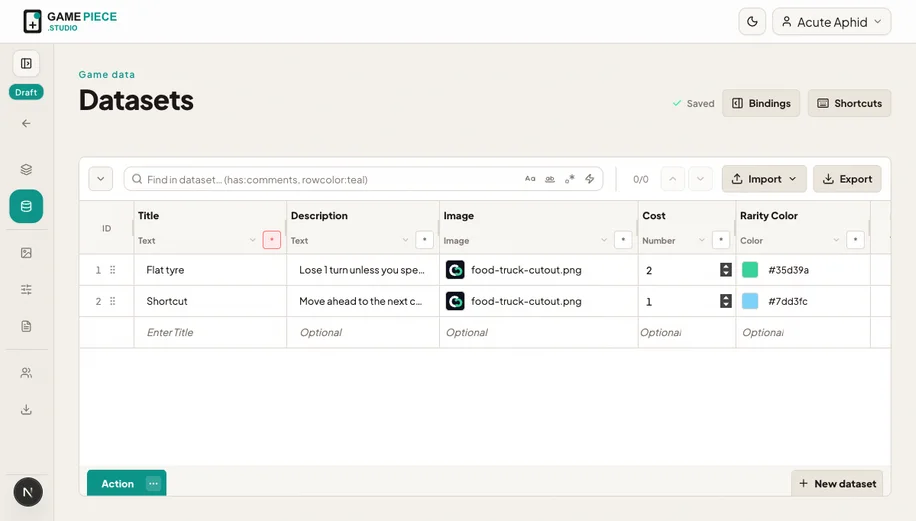 This dataset can feed one reusable card design with different titles, descriptions, images, costs, and colours.
A simple card dataset
| Title | Rules | Cost | Artwork | Frame colour |
|---|---|---|---|---|
| Market Dash | Move two spaces. | 2 | market-dash.png | Teal |
| Late Delivery | Draw another card. | 1 | late-delivery.png | Coral |
The first column is usually a short human-readable identifier. Give columns stable names before connecting them to designs.
Create a dataset
- Open Datasets and choose New dataset.
- Add the columns your pieces need.
- Enter two or three representative rows.
- Open a design and assign the dataset.
- Bind layers to columns and preview each test row.
Editing together
Changes appear live for teammates with access. Presence and cell indicators help show where other people are working. Avoid replacing the entire dataset while someone is editing it; a replacement can change row and column keys used by their design.
Rows are content, not layouts
Keep layout instructions in the Designer. A dataset should hold meaningful game content such as a title, value, image, option, or colour. This makes the same data easier to reuse across cards, tokens, rules sheets, and references.
Dataset output
Dataset Export downloads tab-separated text for spreadsheet work. Project and card exports are separate tools. See Import and export data for the safest round trip.