Preview and check generated pieces
The Export workspace combines the selected design with its dataset rows and options variants. It is the best place to review the collection that players and printers will actually receive.
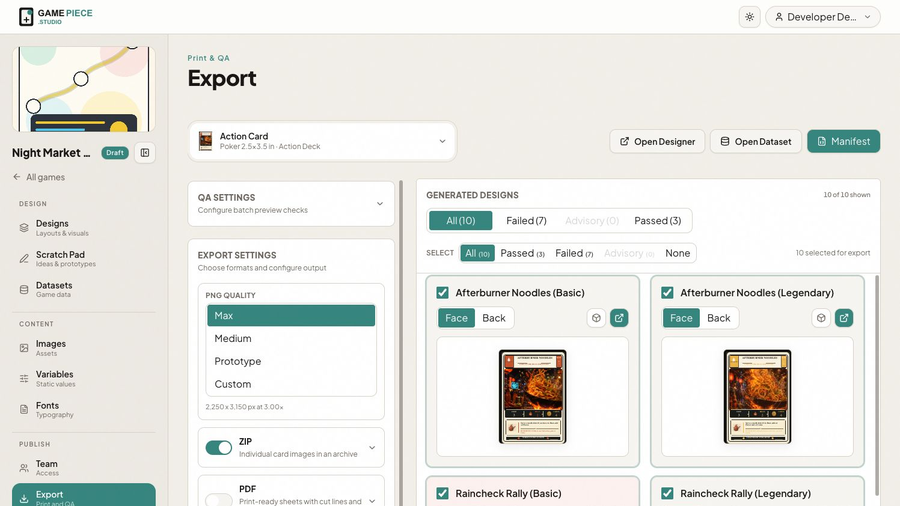 Filter generated pieces by passed, failed, or advisory QA results before choosing what to export.
Choose a design
Select the design at the top of Export. Studio generates its face, back, rows, and options variants. A count near the preview tells you how much of the generated collection is currently shown.
Use Open Designer or Open Dataset when a problem belongs in the source. Return to Export after the source has saved and refresh the generated view.
QA result types
Errors
- Unresolved value means a binding, expression, variable, image, or reference could not produce its required content.
- Text error means text could not be laid out or rendered correctly.
Resolve errors before producing a final export.
Advisories
- Low-resolution image warns that artwork may not have enough detail at the output size.
- Layer outside the card identifies an object extending beyond the piece.
- Content outside the safe area identifies important content near the expected cut variation.
An advisory can be intentional—background bleed should leave the card—but it must be reviewed rather than ignored as a group.
Hidden layers do not create normal QA output.
A useful review order
- Filter to Failed and resolve every error.
- Review advisories one type at a time.
- Check front and back for the shortest, longest, and most complex pieces.
- Check every options variant.
- Select only the pieces intended for this proof.
- Export a small sample before the full collection.
Designer-wide QA is not currently a separate feature. The released QA workflow belongs to Export and evaluates generated output.