Choose and manage fonts
Fonts are part of the project so teammates and exports can use the same typography.
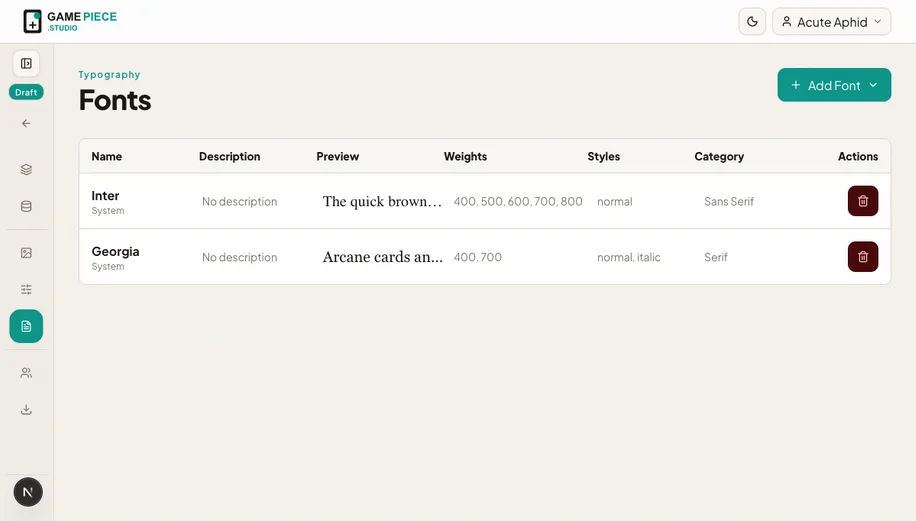 Build a small, purposeful font palette instead of choosing a different typeface in every design.
Font sources
- Google fonts can be added from the supported library.
- Uploaded fonts use font files you provide for the project.
- System fonts may look different across computers and are less predictable for shared production work.
Add a font
- Open Fonts.
- Add a supported Google family or upload the licensed font file.
- Wait for the font to become ready.
- Apply it to representative text layers.
- Check the Designer and an exported proof.
Font licensing
Studio stores and uses the file you provide; it does not grant a licence. Confirm that your licence covers team use, digital prototypes, printed copies, and commercial distribution as applicable.
Avoid layout surprises
Different fonts have different character widths and vertical metrics. After changing a family or weight, check:
- The longest title and rules paragraph.
- Uppercase and accented characters used by the game.
- Small labels at print size.
- Every place where text must align with an icon or frame.
Do not delete a font while a design still uses it. Replace the font in those layers, export a proof, then remove the unused family.